1:1 Continuous Observation
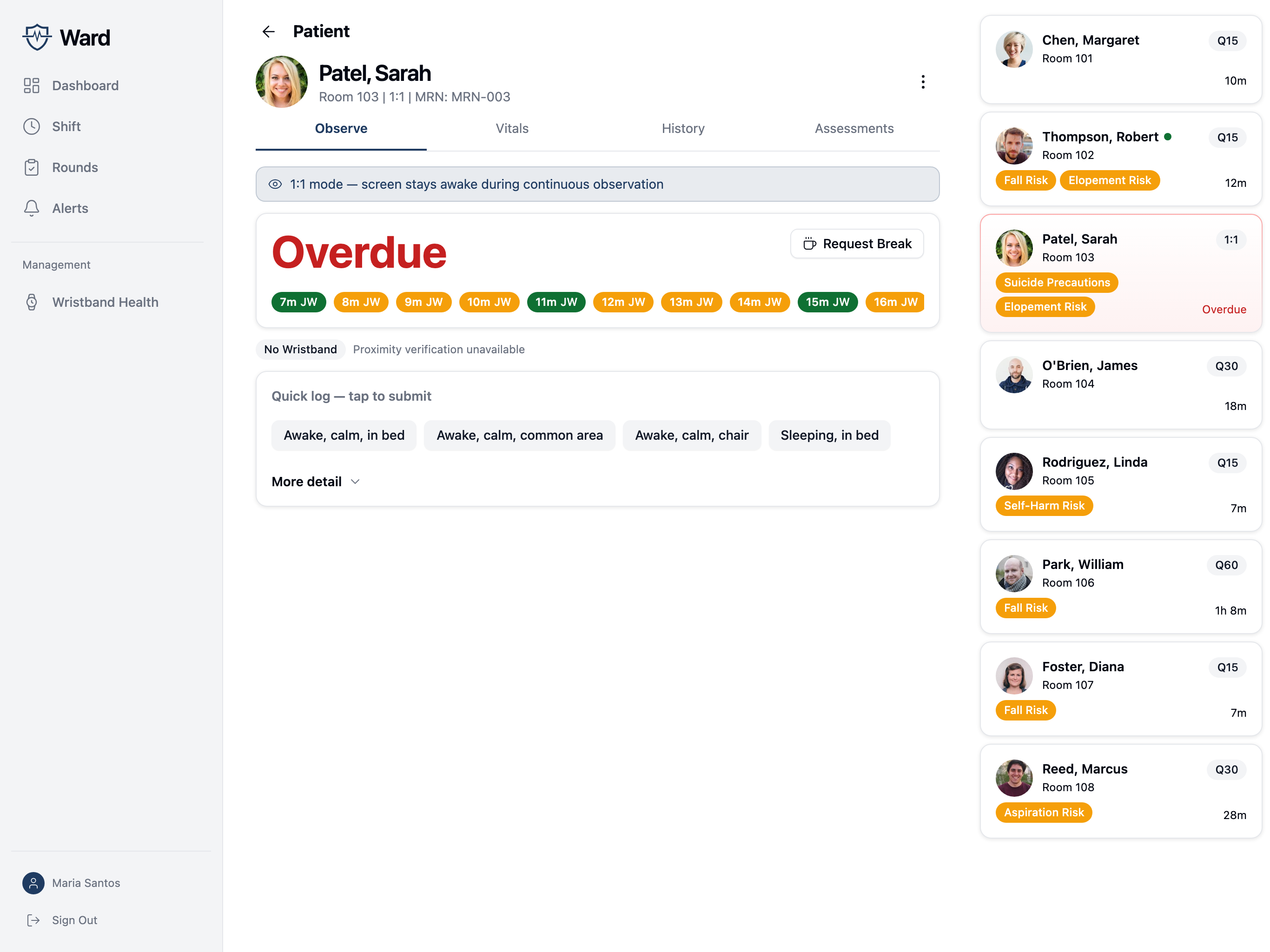
When a patient is on observation level 1:1, the Observe tab is replaced with a purpose-built screen for continuous watching. The standard interval-based form (proximity → fill → submit) is hidden in favor of a layout designed for documenting frequent quick check-ins without leaving the patient's side.
Need to suspend 1:1 alerts temporarily? Use a Pause for escorts and other supervised periods. The 1:1 gap timer doesn't fire while a pause is active and resumes from the pause end when it lifts.
Active 1:1 Display
When you open the Observe tab for a 1:1 patient, you'll see:
- 1:1 mode banner confirming you're in the dedicated mode and that the screen will stay awake
- Time since last observation — large count-up timer that turns red once the gap exceeds 1.5 minutes (the late threshold)
- Recent activity strip — the last 15 observations as horizontal pills showing relative time and the documenting nurse's initials, color-coded by gap to the previous obs (green → on-time, amber → late, red → past the late threshold)
- Proximity verification — same gating as standard observations
- Quick log templates — four one-tap submit buttons for the most common combinations
- More detail panel — collapsible section with the full status/location selectors and a notes field for non-routine entries
- Request Break button — push-routed escalation when you need relief
Wake Lock
The 1:1 screen keeps the device awake while open. On native iOS/Android this uses the OS keep-awake API. On web it uses the browser's wake-lock API where supported (most desktop browsers; iOS Safari does not support it).
When you navigate away, the wake-lock is released automatically.
Quick Log Templates
Four one-tap templates submit immediately on press:
| Template | Status | Location |
|---|---|---|
| Awake, calm, in bed | Awake, calm | In bed |
| Awake, calm, common area | Awake, calm | Common area |
| Awake, calm, chair | Awake, calm | In chair |
| Sleeping, in bed | Sleeping | In bed |
During night mode hours, the Sleeping, in bed template is highlighted and shown first.
Each tap creates a new observation with the patient's current proximity verification stamp. There is no separate Submit step — tap once and the activity strip and timer update immediately.
More Detail Panel
For observations that don't fit a quick template — different status, different location, or anything that needs notes — open More detail:
- Patient Status: any of the standard statuses (sleeping, awake/calm, awake/agitated, awake/distressed, off unit, other)
- Location: any of the standard locations (bed, chair, bathroom, common area, off unit, other)
- Notes (optional)
- Submit Observation button
The panel stays open after you submit, so you can keep using it for a stretch of similar observations. Selections persist between submissions; only the notes field clears. Close the panel manually when you no longer need it.
Activity Strip
The strip shows the last 15 observations as small color-coded pills. Each pill shows:
- Relative time since that observation (e.g.,
now,5m,1h) - Initials of the nurse who documented it
Pill color reflects the gap to the previous observation, not the absolute time. A run of green pills means coverage stayed on-time; a yellow or red pill marks where the gap stretched. This makes hand-offs visible — when you see different initials in the strip, that's where the previous nurse handed over to you (or vice versa).
The strip scrolls horizontally if there's not enough space for all 15 pills.
Coverage Timer Color
| State | Threshold | Color |
|---|---|---|
| On-time | < 1 minute | Foreground (default) |
| Late | 1.5+ minutes | Destructive (red) |
The yellow band between 1:00 and 1:30 is reflected in the strip pill color but the main timer is binary — either you're under the late threshold or you're not. Once the gap reaches 5 minutes, the gap detector files a critical 1:1 Gap alert (see Alert Configuration).
Request Break
The Request Break button (top-right of the timer card) pings the right person without creating an alert.
When you tap it:
- Confirm dialog asks you to confirm the request.
- Server resolves who to notify:
- If a relief nurse is assigned to this patient on the active shift → push notification only to that nurse.
- Otherwise → broadcast push to all on-shift unit staff (excluding you).
- Toast confirms the recipient: "Relief notified" or "Unit notified."
- The button enters a 60-second cooldown so you can't accidentally double-fire it.
There is no separate alert created. The relief handshake is implicit: when the relief nurse arrives and logs an observation, you'll see their initials in the activity strip. At that point you can step away.
If no relief shows up and you actually leave the patient, the standard 5-minute gap detector will fire a critical 1:1 Gap alert against the patient — that's the safety net.
Note: a break request notifies on-shift staff who have push notifications enabled, on iOS, Android, or web. If no one on shift has notifications turned on, the request returns "No staff available to notify."
What's not in v1
The following are deliberately out of scope for the current implementation:
- Stillness / movement-detection alerts ("please confirm you are alert")
- Explicit relief handshake confirmation (the relief nurse logging an obs is the only signal)
- Break-overdue alert escalating to the charge nurse
- Per-facility wake-lock opt-out
- Notes draft persistence across navigation/refresh